The CMMS your technicians will actually use.
Maintelix keeps your asset register, preventive plans, work orders, inspections and spare parts in one place. Your team spends its day on the equipment, not in spreadsheets.
No credit card · French, English, Arabic · Try the demo
- The team behind Oilserv's CMMSSince 2023 we have built and run the maintenance system of an oilfield services company.
- Built in AlgeriaDesigned and developed here, for the way maintenance is run here.
- One database per customerYour data is never mixed with anyone else's, and you can export it.
- Local supportPeople you can reach, in French and in Arabic.
Everything your maintenance team needs.
One system for the asset register, the maintenance plan, the daily work and the numbers that come out of it.
Asset management
A structured register of every asset, with its technical data, meters and history.
Learn morePreventive maintenance
Calendar and meter-based plans that raise work orders before the due date.
Learn moreWork orders
From request to closure: tasks, labour, parts and a full audit trail.
Learn moreMaintenance planning
A dispatch board to schedule work and balance technician workload.
Learn moreInspections
Your own checklists, inspection rounds and non-conformity follow-up.
Learn moreSpare parts & inventory
Stock by warehouse and bin, reservations, counts and purchase requests.
Learn moreTeam management
Users, teams and roles. Each person sees and does what their role allows.
Learn moreAnalytics & reporting
MTBF, MTTR, availability, compliance, backlog and cost, with drill-down.
Learn moreOne flow, from the first report to the final analysis.
A CMMS follows a job through its whole life. Here is what that looks like in Maintelix.
Detect
A failure is reported by QR code, email or a technician. A preventive plan comes due. An inspection finds a defect.
Plan
The work order gets a priority, a due date, the tasks to do and the parts to reserve.
Assign
The planner gives it to a technician or a team on the dispatch board.
Execute
The technician follows the tasks and the checklist, on the web or on the mobile app, even offline.
Close
Hours, parts used and failure codes are recorded. Completion rules make sure nothing is missing.
Analyze
Every closed job feeds the KPIs: reliability, downtime, compliance and cost per asset.
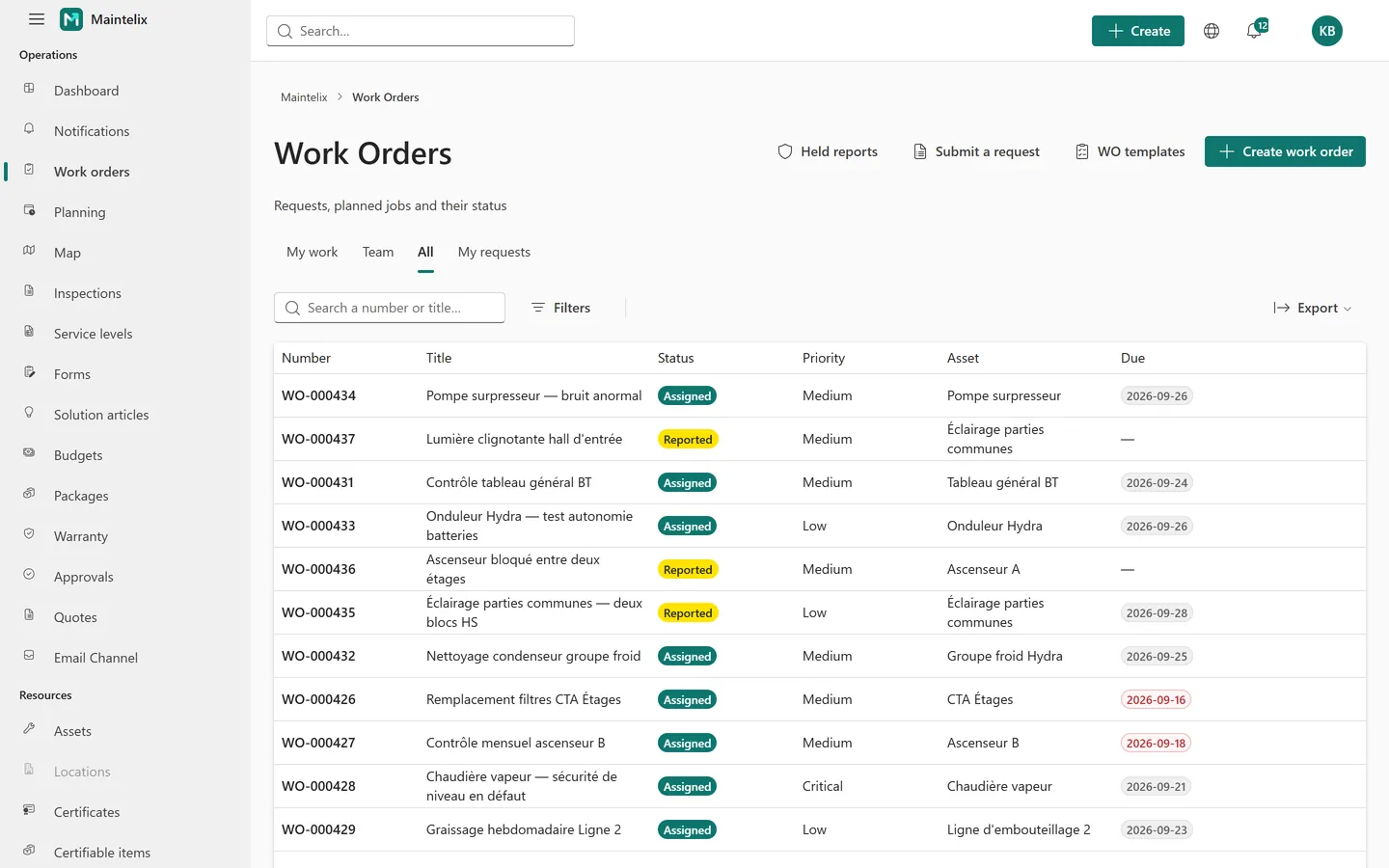
See the actual screens.
Captured from a demo workspace. This is the interface your team will use.
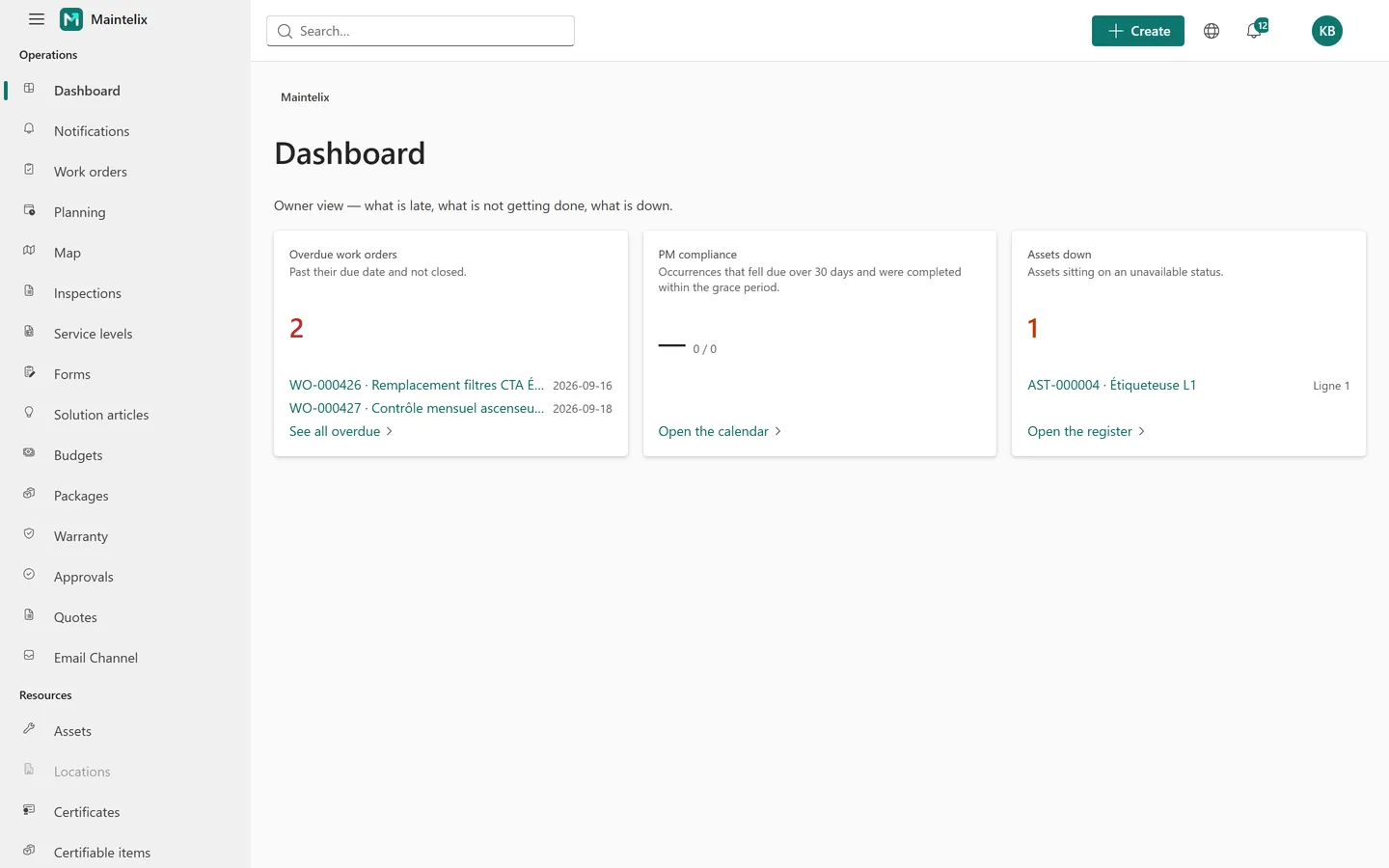
The operations view: overdue work orders, preventive compliance, assets that are down.
Know every asset. Understand its history.
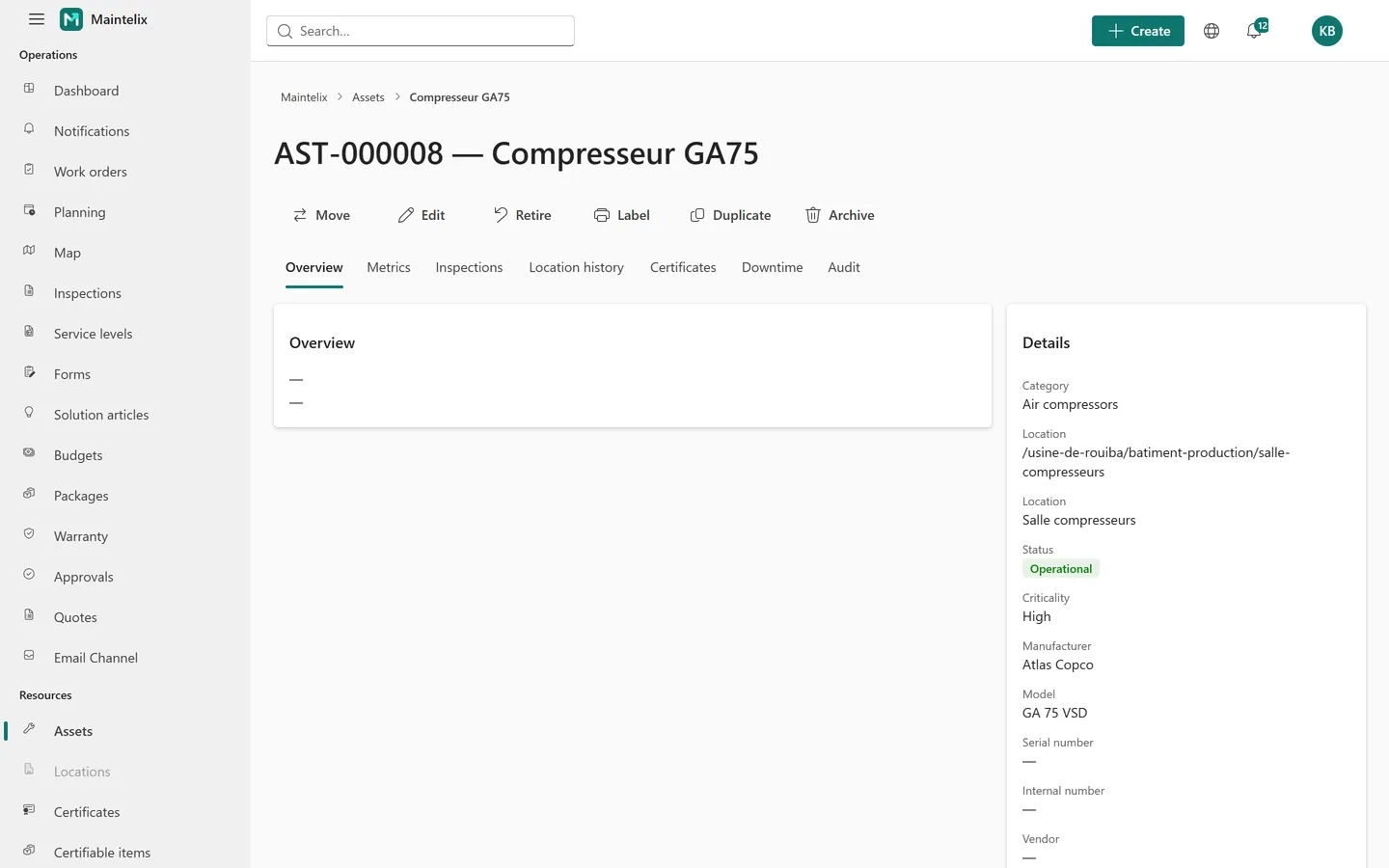
Each asset has one page that gathers what your team knows about it. No more searching through spreadsheets, binders and memories.
- Technical information
- Maintenance history
- Preventive plans
- Work orders
- Inspections
- Certificates
- Meters & KPIs
Prevent problems before they become downtime.
Define the plan once. Maintelix raises the work ahead of time, and tells you how much of the plan was actually done.
Schedule
Notify
Create work order
Assign
Execute
Record
Analyze
Maintenance wherever your technicians work.
A plant floor, a basement, a remote site. The Android app keeps the work on the device and syncs when the network is back.
Assigned work
Each technician opens the list of work orders assigned to them.
QR code scanning
Scan the label on an asset to identify it on the spot.
Work order execution
Start the job, follow the tasks and tick them off one by one.
Checklists & forms
Fill in the form attached to the job, and run inspections.
Photos
Take pictures from the phone and attach them to the work.
Parts & labour
Record the parts used and the hours spent.
Completion
Close the job. The same completion rules apply as on the web.
Offline first
Work without a network. Changes sync automatically afterwards.
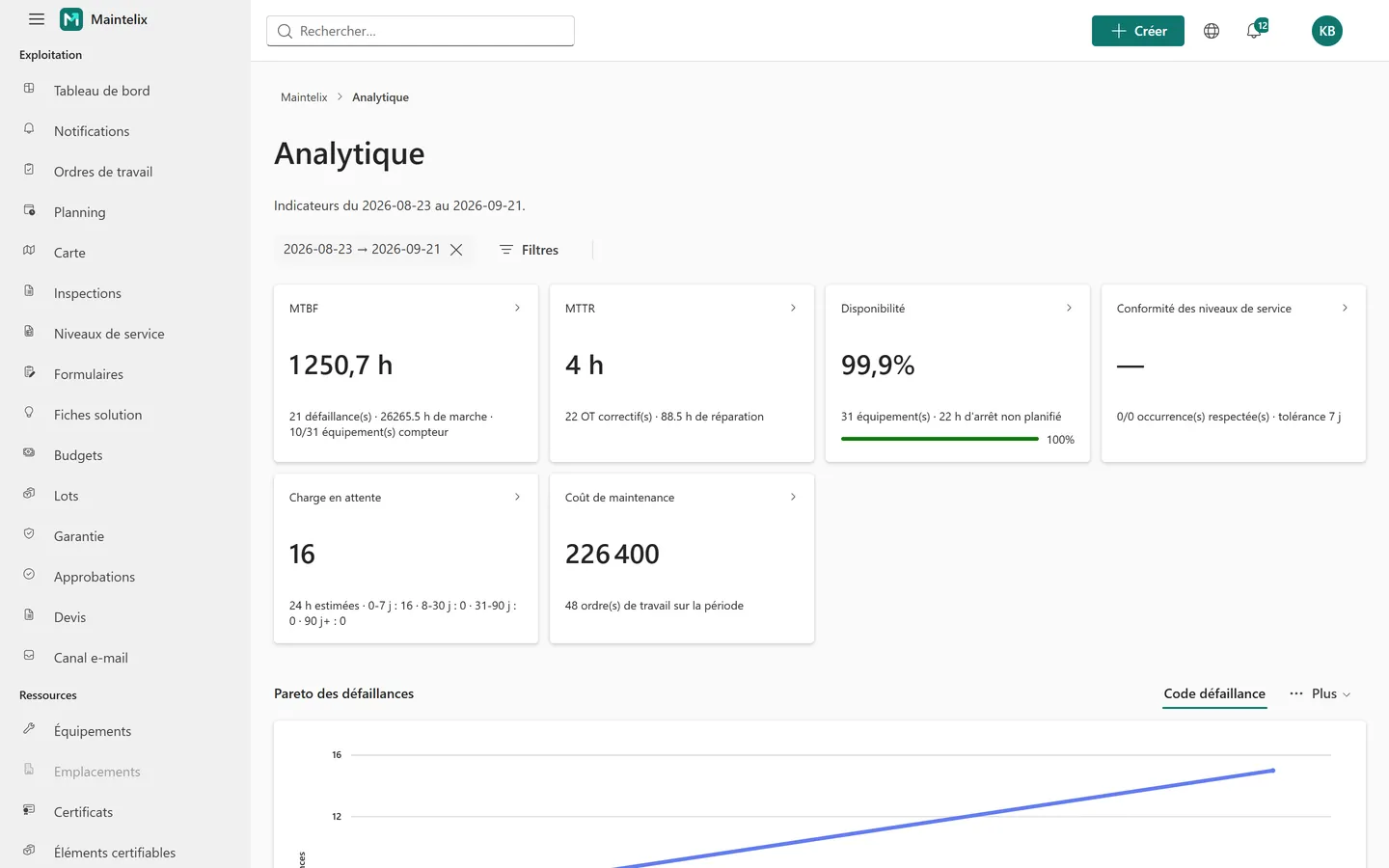
The indicators maintenance managers are asked for.
Calculated from your work orders, downtime records and meters. Click any figure to see the records behind it.
- MTBFMean time between failures, from running hours and failure counts.
- MTTRMean time to repair, from corrective work orders.
- AvailabilityShare of time assets were available, from unplanned downtime.
- PM compliancePreventive occurrences done within tolerance.
- BacklogOpen work and estimated hours, by age.
- Maintenance costLabour and parts actually used, per period.
Built for maintenance-intensive industries.
The same platform, configured to your assets, your vocabulary and your way of working.
Manufacturing
Production lines, utilities and machines. Meter-based plans, downtime and failure analysis.
See the solutionOil & gas
Critical equipment on remote sites. Inspections, certificates, calibration and offline work.
See the solutionEnergy & utilities
Distributed assets, inspection rounds and regulatory checks, located on a map.
Fleet & transport
Vehicles and mobile equipment. Service by mileage or hours, parts and cost per vehicle.
See the solutionFacilities
Buildings and technical installations. Requests by QR code, planned rounds and contractors.
See the solutionConstruction
Site machinery and tools. Hour meters, inspections and equipment that moves between sites.
What changes for your maintenance department.
Centralized maintenance data
Assets, work, parts and documents in one system instead of scattered files.
Preventive maintenance planning
Plans that raise their own work orders, by date or by meter.
Complete maintenance traceability
Who did what, when, on which asset, with which parts. Every change is audited.
Better work-order management
Clear priorities, assignments and due dates. Nothing stays in someone's head.
Improved asset visibility
Status, criticality, location and history of each asset at a glance.
Maintenance performance analytics
MTBF, MTTR, availability, compliance, backlog and cost from your own data.
Mobile field execution
Technicians work on their phone, online or offline.
Built for how you actually work
One product, two operating modes. You choose yours when you create the workspace.
You own the equipment
Factories, fleets, hospitals, facilities. Your equipment, your technicians, your service levels — and every cost lands on the equipment it belongs to.
You maintain someone else's
Maintenance contracts, client by client. Every work order, part and hour is scoped to the client it belongs to, and to the contract that pays for it.
Try the demo
Two ready-made workspaces, one per operating mode, full of realistic data. One click signs you in as the maintenance manager. Look around: nothing you do there reaches anyone.
Owner-operator demo
An industrial group maintaining its own plants, fleet and facilities.
Open the demoFrequently asked questions
Ready to take control of your maintenance operations?
See how Maintelix can help your team plan, execute and improve maintenance.